> ## Documentation Index
> Fetch the complete documentation index at: https://docs-staging-docs-add-auth0-cli-management-api-examples.mintlify.site/llms.txt
> Use this file to discover all available pages before exploring further.

# Variables et fonctions utilitaires

> Apprenez à utiliser les variables dans les Formulaires pour les Actions.

Les variables vous permettent d’accéder aux données contenues dans les Formulaires et les Flux pour créer une logique commerciale et des automatismes personnalisés.

Voici quelques considérations de base sur l’utilisation des variables :

* Les variables sont entourées d’accolades `{{ variable }}`.
* Si une variable n’existe pas ou ne peut pas être résolue, elle a le même effet qu’une variable dont la valeur est `undefined (indéfini)`.
* Vous pouvez utiliser des opérateurs nuls pour gérer les variables dont la valeur est `null` ou `undefined`, par exemple :`{{fields.foo ?? fields.bar}}`.

## Variables disponibles

Vous pouvez utiliser différents types de variables pour référencer et transformer les données que vous recueillez auprès des clients avec les Formulaires et les Flux.

| Variable                   | \_Syntax          | Where              | Description                                                                  |
| -------------------------- | ----------------- | ------------------ | ---------------------------------------------------------------------------- |
| Contexte                   | `{{contexte.*}}`  | Formes / Flux      | Données contextuelles de référence de la transaction en cours                |
| Champs de formulaire       | `{{fields. *}}`   | Formulaires / Flux | Données de référence des champs de votre formulaire et des champs cachés     |
| Variables partagées        | `{{vars.*}}`      | Formulaires / Flux | Données de référence stockées en tant que variables partagées                |
| Sortie des actions de flux | `{{actions. *}}`  | Flux               | Données de référence de la réponse de sortie des actions de flux précédentes |
| Fonctions d’aide           | `{{fonctions.*}}` | Formulaires / Flux | Fonctions d’aide pour transformer les données                                |

### Variables de contexte

Les Formulaires et les Flux héritent automatiquement des variables de contexte de la transaction en cours. Vous pouvez accéder aux variables de contexte suivantes :

* L’objet `user`, avec accès aux propriétés suivantes :

  * `user.user_id`
  * `user.username`
  * `user.name`
  * `user.given_name`
  * `user.family_name`
  * `user.nickname`
  * `user.email`
  * `user.email_verified`
  * `user.phone_number`
  * `user.phone_verified`
  * `user.picture`
  * `user.user_metadata`
  * `user.app_metadata`
  * `user.created_at`
  * `user.updated_at`
  * `user.last_password_reset`
  * `user.identities`
* L’objet `organization`, avec accès aux propriétés suivantes :

  * `organization.id`
  * `organization.name`
  * `organization.display_name`
  * `organization.metadata`
* L’objet `client`, avec accès aux propriétés suivantes :

  * `client.client_id`
  * `client.name`
* L’objet `tenant (locataire)`, avec accès à la propriété suivante :

  * `tenant.name`
* L’objet `transaction`, avec accès à la propriété suivante :

  * `transaction.state`

<Accordion title="Exemple d’objet contextuel">
  ```json lines theme={null}
  {
    "user": {
      "user_id": "auth0|658409...",
      "name": "ana@travel0.com",
      "nickname": "ana",
      "email": "ana@travel0.com",
      "email_verified": true,
      "picture": "https://s.gravatar.com/avatar/8eb1b522f6...",
      "user_metadata": {},
      "app_metadata": {},
      "created_at": "2023-12-21T09:46:40.487Z",
      "updated_at": "2024-05-07T10:44:26.271Z",
      "last_password_reset": "2023-12-21T09:49:08.932Z",
      "identities": [
        {
          "user_id": "6584...",
          "isSocial": false,
          "provider": "auth0",
          "connection": "Username-Password-Authentication"
        }
      ]
    },
    "client": {
      "client_id": "xpeg5...",
      "name": "My App"
    },
    "tenant": {
      "name": "tenant-testing"
    },
    "transaction": {
      "state": "hKFo2SBId2M0..."
    }
  }
  ```
</Accordion>

Par exemple :  `{{context.user.user_id}}` référence `user_id` de l’objet `user`.

<Frame>
  <img src="https://mintcdn.com/docs-staging-docs-add-auth0-cli-management-api-examples/cQfrQxXNmJT2dZvx/docs/images/fr-ca/cdy7uua7fh8z/3B8DRhXO2wGqeqSFb8KbQv/0a61cdbbb7f1d290950a2ddb9857aac3/Contex-variable.png?fit=max&auto=format&n=cQfrQxXNmJT2dZvx&q=85&s=a29eace90dc5d343bddca5f8bb89df74" alt="Dashboard > Forms > Flows" data-og-width="1141" width="1141" data-og-height="219" height="219" data-path="docs/images/fr-ca/cdy7uua7fh8z/3B8DRhXO2wGqeqSFb8KbQv/0a61cdbbb7f1d290950a2ddb9857aac3/Contex-variable.png" data-optimize="true" data-opv="3" srcset="https://mintcdn.com/docs-staging-docs-add-auth0-cli-management-api-examples/cQfrQxXNmJT2dZvx/docs/images/fr-ca/cdy7uua7fh8z/3B8DRhXO2wGqeqSFb8KbQv/0a61cdbbb7f1d290950a2ddb9857aac3/Contex-variable.png?w=280&fit=max&auto=format&n=cQfrQxXNmJT2dZvx&q=85&s=e49f7ce033522ed89c4ef26da0f6e788 280w, https://mintcdn.com/docs-staging-docs-add-auth0-cli-management-api-examples/cQfrQxXNmJT2dZvx/docs/images/fr-ca/cdy7uua7fh8z/3B8DRhXO2wGqeqSFb8KbQv/0a61cdbbb7f1d290950a2ddb9857aac3/Contex-variable.png?w=560&fit=max&auto=format&n=cQfrQxXNmJT2dZvx&q=85&s=39a623ec45a36e1933473a4d534b197b 560w, https://mintcdn.com/docs-staging-docs-add-auth0-cli-management-api-examples/cQfrQxXNmJT2dZvx/docs/images/fr-ca/cdy7uua7fh8z/3B8DRhXO2wGqeqSFb8KbQv/0a61cdbbb7f1d290950a2ddb9857aac3/Contex-variable.png?w=840&fit=max&auto=format&n=cQfrQxXNmJT2dZvx&q=85&s=1d1cb7e87244e0bfd6f90d271536ac09 840w, https://mintcdn.com/docs-staging-docs-add-auth0-cli-management-api-examples/cQfrQxXNmJT2dZvx/docs/images/fr-ca/cdy7uua7fh8z/3B8DRhXO2wGqeqSFb8KbQv/0a61cdbbb7f1d290950a2ddb9857aac3/Contex-variable.png?w=1100&fit=max&auto=format&n=cQfrQxXNmJT2dZvx&q=85&s=00b5d50435e9eb469434f55ff9fc5a59 1100w, https://mintcdn.com/docs-staging-docs-add-auth0-cli-management-api-examples/cQfrQxXNmJT2dZvx/docs/images/fr-ca/cdy7uua7fh8z/3B8DRhXO2wGqeqSFb8KbQv/0a61cdbbb7f1d290950a2ddb9857aac3/Contex-variable.png?w=1650&fit=max&auto=format&n=cQfrQxXNmJT2dZvx&q=85&s=270cc8c3040e22be5bab9a545f0944c7 1650w, https://mintcdn.com/docs-staging-docs-add-auth0-cli-management-api-examples/cQfrQxXNmJT2dZvx/docs/images/fr-ca/cdy7uua7fh8z/3B8DRhXO2wGqeqSFb8KbQv/0a61cdbbb7f1d290950a2ddb9857aac3/Contex-variable.png?w=2500&fit=max&auto=format&n=cQfrQxXNmJT2dZvx&q=85&s=0876ce9ee4f79b9e6754cc8ce8677466 2500w" />
</Frame>

### Variables des champs du formulaire

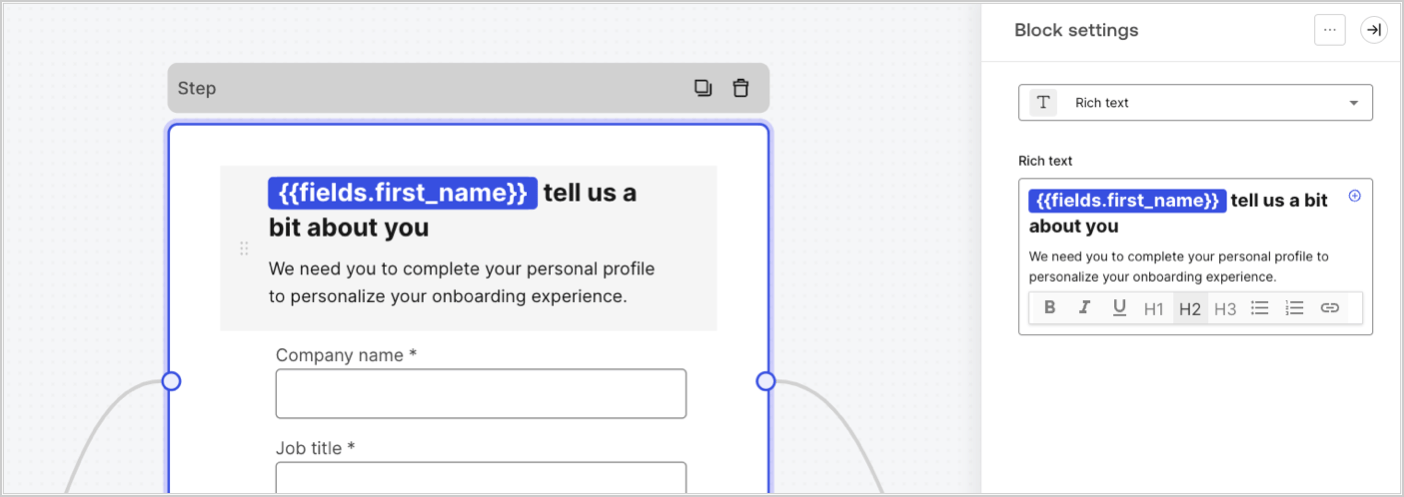
Les variables de champ contiennent les données recueillies auprès de l’utilisateur dans les champs de saisie du formulaire et les données des champs cachés. Les données de chaque champ varient en fonction du type de champ. Par exemple : `{{fields.first_name}}` référence la valeur saisie dans le champ ayant l’ID `first_name`.
<Frame>
  <img src="https://mintcdn.com/docs-staging-docs-add-auth0-cli-management-api-examples/ZUC7zHJNUlK_us_d/docs/images/fr-ca/cdy7uua7fh8z/4D42A6ww4XvFxweoxh04Rd/016c2ed9d25bc2267ed3ed31bf8b2bf6/form-fields-variable.png?fit=max&auto=format&n=ZUC7zHJNUlK_us_d&q=85&s=8a34da7de11039fe8c8207540e63af7f" alt="Dashboard > Actions > Forms > Form" data-og-width="1404" width="1404" data-og-height="497" height="497" data-path="docs/images/fr-ca/cdy7uua7fh8z/4D42A6ww4XvFxweoxh04Rd/016c2ed9d25bc2267ed3ed31bf8b2bf6/form-fields-variable.png" data-optimize="true" data-opv="3" srcset="https://mintcdn.com/docs-staging-docs-add-auth0-cli-management-api-examples/ZUC7zHJNUlK_us_d/docs/images/fr-ca/cdy7uua7fh8z/4D42A6ww4XvFxweoxh04Rd/016c2ed9d25bc2267ed3ed31bf8b2bf6/form-fields-variable.png?w=280&fit=max&auto=format&n=ZUC7zHJNUlK_us_d&q=85&s=2bce9505326381c0ed4d347efb285279 280w, https://mintcdn.com/docs-staging-docs-add-auth0-cli-management-api-examples/ZUC7zHJNUlK_us_d/docs/images/fr-ca/cdy7uua7fh8z/4D42A6ww4XvFxweoxh04Rd/016c2ed9d25bc2267ed3ed31bf8b2bf6/form-fields-variable.png?w=560&fit=max&auto=format&n=ZUC7zHJNUlK_us_d&q=85&s=43d0828611a44135fe8ae4b90d2cd210 560w, https://mintcdn.com/docs-staging-docs-add-auth0-cli-management-api-examples/ZUC7zHJNUlK_us_d/docs/images/fr-ca/cdy7uua7fh8z/4D42A6ww4XvFxweoxh04Rd/016c2ed9d25bc2267ed3ed31bf8b2bf6/form-fields-variable.png?w=840&fit=max&auto=format&n=ZUC7zHJNUlK_us_d&q=85&s=88961be12e799c84d015b11ea3d6c805 840w, https://mintcdn.com/docs-staging-docs-add-auth0-cli-management-api-examples/ZUC7zHJNUlK_us_d/docs/images/fr-ca/cdy7uua7fh8z/4D42A6ww4XvFxweoxh04Rd/016c2ed9d25bc2267ed3ed31bf8b2bf6/form-fields-variable.png?w=1100&fit=max&auto=format&n=ZUC7zHJNUlK_us_d&q=85&s=370d3a8141310a28247ba7b9d56ae224 1100w, https://mintcdn.com/docs-staging-docs-add-auth0-cli-management-api-examples/ZUC7zHJNUlK_us_d/docs/images/fr-ca/cdy7uua7fh8z/4D42A6ww4XvFxweoxh04Rd/016c2ed9d25bc2267ed3ed31bf8b2bf6/form-fields-variable.png?w=1650&fit=max&auto=format&n=ZUC7zHJNUlK_us_d&q=85&s=386c312f1a0ec28d2fabacd3875b1641 1650w, https://mintcdn.com/docs-staging-docs-add-auth0-cli-management-api-examples/ZUC7zHJNUlK_us_d/docs/images/fr-ca/cdy7uua7fh8z/4D42A6ww4XvFxweoxh04Rd/016c2ed9d25bc2267ed3ed31bf8b2bf6/form-fields-variable.png?w=2500&fit=max&auto=format&n=ZUC7zHJNUlK_us_d&q=85&s=f7df32b3f3a3311f7d2654c6348dcbeb 2500w" />
</Frame>

### Variables des actions de sortie de flux

Lorsqu’une action de flux est exécutée, elle génère un objet qui peut être référencé dans les actions suivantes. Par exemple : `{{actions.generate_otp.code}}` référence le code résultant de l’action avec l’ID`generate_otp`.

<Frame>
  <img src="https://mintcdn.com/docs-staging-docs-add-auth0-cli-management-api-examples/SnNqnTH8RY9GVy-E/docs/images/fr-ca/cdy7uua7fh8z/6jYtEdYqSGXm3DDv0mxQ0o/2d48012629745e07137bf6ba42f4d829/flow-output-variable.png?fit=max&auto=format&n=SnNqnTH8RY9GVy-E&q=85&s=c9d96714a53b4f32016b0272948811a2" alt="Dashboard > Actions > Forms > Flows" data-og-width="1404" width="1404" data-og-height="253" height="253" data-path="docs/images/fr-ca/cdy7uua7fh8z/6jYtEdYqSGXm3DDv0mxQ0o/2d48012629745e07137bf6ba42f4d829/flow-output-variable.png" data-optimize="true" data-opv="3" srcset="https://mintcdn.com/docs-staging-docs-add-auth0-cli-management-api-examples/SnNqnTH8RY9GVy-E/docs/images/fr-ca/cdy7uua7fh8z/6jYtEdYqSGXm3DDv0mxQ0o/2d48012629745e07137bf6ba42f4d829/flow-output-variable.png?w=280&fit=max&auto=format&n=SnNqnTH8RY9GVy-E&q=85&s=fb4c9083c53433b78177e56c3c525867 280w, https://mintcdn.com/docs-staging-docs-add-auth0-cli-management-api-examples/SnNqnTH8RY9GVy-E/docs/images/fr-ca/cdy7uua7fh8z/6jYtEdYqSGXm3DDv0mxQ0o/2d48012629745e07137bf6ba42f4d829/flow-output-variable.png?w=560&fit=max&auto=format&n=SnNqnTH8RY9GVy-E&q=85&s=1d5c445bfab99556344fb2e351b2e27f 560w, https://mintcdn.com/docs-staging-docs-add-auth0-cli-management-api-examples/SnNqnTH8RY9GVy-E/docs/images/fr-ca/cdy7uua7fh8z/6jYtEdYqSGXm3DDv0mxQ0o/2d48012629745e07137bf6ba42f4d829/flow-output-variable.png?w=840&fit=max&auto=format&n=SnNqnTH8RY9GVy-E&q=85&s=15ca827c2166724fe240c241d83fcfb7 840w, https://mintcdn.com/docs-staging-docs-add-auth0-cli-management-api-examples/SnNqnTH8RY9GVy-E/docs/images/fr-ca/cdy7uua7fh8z/6jYtEdYqSGXm3DDv0mxQ0o/2d48012629745e07137bf6ba42f4d829/flow-output-variable.png?w=1100&fit=max&auto=format&n=SnNqnTH8RY9GVy-E&q=85&s=6c75b89bd2a27188dbaa433586864499 1100w, https://mintcdn.com/docs-staging-docs-add-auth0-cli-management-api-examples/SnNqnTH8RY9GVy-E/docs/images/fr-ca/cdy7uua7fh8z/6jYtEdYqSGXm3DDv0mxQ0o/2d48012629745e07137bf6ba42f4d829/flow-output-variable.png?w=1650&fit=max&auto=format&n=SnNqnTH8RY9GVy-E&q=85&s=c0f08115e0928e9f53da60dc7a353f56 1650w, https://mintcdn.com/docs-staging-docs-add-auth0-cli-management-api-examples/SnNqnTH8RY9GVy-E/docs/images/fr-ca/cdy7uua7fh8z/6jYtEdYqSGXm3DDv0mxQ0o/2d48012629745e07137bf6ba42f4d829/flow-output-variable.png?w=2500&fit=max&auto=format&n=SnNqnTH8RY9GVy-E&q=85&s=faee90046185462523a3b5195ec54498 2500w" />
</Frame>

### Variables partagées

Vous pouvez stocker des variables à partager avec des flux ultérieurs ou même avec des composants de formulaire dans la même transaction. Les variables partagées sont éphémères et sont associées à un parcours de formulaire spécifique. Leurs valeurs ne sont pas accessibles en dehors de ce parcours. Par exemple : `{{vars.external_id}}` référence la valeur d’une variable partagée avec l’ID `external_id`.

<Frame>
  <img src="https://mintcdn.com/docs-staging-docs-add-auth0-cli-management-api-examples/ZUC7zHJNUlK_us_d/docs/images/fr-ca/cdy7uua7fh8z/4571ExRTHL0KZKJKX9pNwj/abb631b8608a6356b0e5b3784cf8b02f/flow-shared-variable.png?fit=max&auto=format&n=ZUC7zHJNUlK_us_d&q=85&s=d614a809e6bd406c391ce903472fea52" alt="Dashboard > Actions > Forms > Flows" data-og-width="1215" width="1215" data-og-height="162" height="162" data-path="docs/images/fr-ca/cdy7uua7fh8z/4571ExRTHL0KZKJKX9pNwj/abb631b8608a6356b0e5b3784cf8b02f/flow-shared-variable.png" data-optimize="true" data-opv="3" srcset="https://mintcdn.com/docs-staging-docs-add-auth0-cli-management-api-examples/ZUC7zHJNUlK_us_d/docs/images/fr-ca/cdy7uua7fh8z/4571ExRTHL0KZKJKX9pNwj/abb631b8608a6356b0e5b3784cf8b02f/flow-shared-variable.png?w=280&fit=max&auto=format&n=ZUC7zHJNUlK_us_d&q=85&s=6bd505d0c39d5594dbdc0e20793188fb 280w, https://mintcdn.com/docs-staging-docs-add-auth0-cli-management-api-examples/ZUC7zHJNUlK_us_d/docs/images/fr-ca/cdy7uua7fh8z/4571ExRTHL0KZKJKX9pNwj/abb631b8608a6356b0e5b3784cf8b02f/flow-shared-variable.png?w=560&fit=max&auto=format&n=ZUC7zHJNUlK_us_d&q=85&s=11fec3d32a7de83f5ae01ac8c7e5664d 560w, https://mintcdn.com/docs-staging-docs-add-auth0-cli-management-api-examples/ZUC7zHJNUlK_us_d/docs/images/fr-ca/cdy7uua7fh8z/4571ExRTHL0KZKJKX9pNwj/abb631b8608a6356b0e5b3784cf8b02f/flow-shared-variable.png?w=840&fit=max&auto=format&n=ZUC7zHJNUlK_us_d&q=85&s=069849322b218790b0538cedd6a28388 840w, https://mintcdn.com/docs-staging-docs-add-auth0-cli-management-api-examples/ZUC7zHJNUlK_us_d/docs/images/fr-ca/cdy7uua7fh8z/4571ExRTHL0KZKJKX9pNwj/abb631b8608a6356b0e5b3784cf8b02f/flow-shared-variable.png?w=1100&fit=max&auto=format&n=ZUC7zHJNUlK_us_d&q=85&s=7b1cf01d0fd6ae1c54edf11eaa40db87 1100w, https://mintcdn.com/docs-staging-docs-add-auth0-cli-management-api-examples/ZUC7zHJNUlK_us_d/docs/images/fr-ca/cdy7uua7fh8z/4571ExRTHL0KZKJKX9pNwj/abb631b8608a6356b0e5b3784cf8b02f/flow-shared-variable.png?w=1650&fit=max&auto=format&n=ZUC7zHJNUlK_us_d&q=85&s=95b063b0b4a3a3ac083c44507c159ed9 1650w, https://mintcdn.com/docs-staging-docs-add-auth0-cli-management-api-examples/ZUC7zHJNUlK_us_d/docs/images/fr-ca/cdy7uua7fh8z/4571ExRTHL0KZKJKX9pNwj/abb631b8608a6356b0e5b3784cf8b02f/flow-shared-variable.png?w=2500&fit=max&auto=format&n=ZUC7zHJNUlK_us_d&q=85&s=477de3950d14f740afdcf1da6a065a44 2500w" />
</Frame>

<Warning>
  Variables partagées :

  * elles sont internes (côté serveur) et ne sont pas exposées au navigateur (côté client).
  * elle peuvent être résolues et exposées au navigateur si vous avez référencé une variable partagée dans le composant de formulaire.
</Warning>

### Fonctions utilitaires

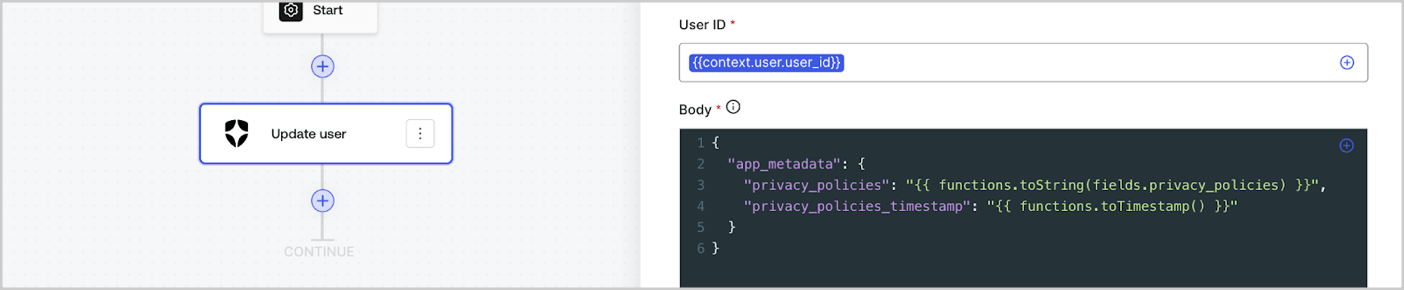
Les fonctions utilitaires permettent de transformer les données et d’effectuer des opérations simples. Par exemple : `{{functions.toString(fields.privacy_policies)}}` transforme la valeur du champ ayant l’ID `privacy_policies` utilisant la fonction `toString()`.
<Frame>
  <img src="https://mintcdn.com/docs-staging-docs-add-auth0-cli-management-api-examples/ZyxfhcZYtAVdzXzy/docs/images/fr-ca/cdy7uua7fh8z/1gyox33XJEtdkT43NppblT/0e878cc5ae2bde11b4207e105bbac6c5/flow-helper-functions.png?fit=max&auto=format&n=ZyxfhcZYtAVdzXzy&q=85&s=133c0a13e1d89f9c7d86b7c92453a997" alt="Dashboard > Actions > Forms > Flows" data-og-width="1404" width="1404" data-og-height="290" height="290" data-path="docs/images/fr-ca/cdy7uua7fh8z/1gyox33XJEtdkT43NppblT/0e878cc5ae2bde11b4207e105bbac6c5/flow-helper-functions.png" data-optimize="true" data-opv="3" srcset="https://mintcdn.com/docs-staging-docs-add-auth0-cli-management-api-examples/ZyxfhcZYtAVdzXzy/docs/images/fr-ca/cdy7uua7fh8z/1gyox33XJEtdkT43NppblT/0e878cc5ae2bde11b4207e105bbac6c5/flow-helper-functions.png?w=280&fit=max&auto=format&n=ZyxfhcZYtAVdzXzy&q=85&s=f7882b97f27328128acd88b16e4543f0 280w, https://mintcdn.com/docs-staging-docs-add-auth0-cli-management-api-examples/ZyxfhcZYtAVdzXzy/docs/images/fr-ca/cdy7uua7fh8z/1gyox33XJEtdkT43NppblT/0e878cc5ae2bde11b4207e105bbac6c5/flow-helper-functions.png?w=560&fit=max&auto=format&n=ZyxfhcZYtAVdzXzy&q=85&s=badf9bb0608a8453de3503222c93b7d0 560w, https://mintcdn.com/docs-staging-docs-add-auth0-cli-management-api-examples/ZyxfhcZYtAVdzXzy/docs/images/fr-ca/cdy7uua7fh8z/1gyox33XJEtdkT43NppblT/0e878cc5ae2bde11b4207e105bbac6c5/flow-helper-functions.png?w=840&fit=max&auto=format&n=ZyxfhcZYtAVdzXzy&q=85&s=7705422a871919ea2b65714b4b908da2 840w, https://mintcdn.com/docs-staging-docs-add-auth0-cli-management-api-examples/ZyxfhcZYtAVdzXzy/docs/images/fr-ca/cdy7uua7fh8z/1gyox33XJEtdkT43NppblT/0e878cc5ae2bde11b4207e105bbac6c5/flow-helper-functions.png?w=1100&fit=max&auto=format&n=ZyxfhcZYtAVdzXzy&q=85&s=1048921dec03926bba6325171ad047df 1100w, https://mintcdn.com/docs-staging-docs-add-auth0-cli-management-api-examples/ZyxfhcZYtAVdzXzy/docs/images/fr-ca/cdy7uua7fh8z/1gyox33XJEtdkT43NppblT/0e878cc5ae2bde11b4207e105bbac6c5/flow-helper-functions.png?w=1650&fit=max&auto=format&n=ZyxfhcZYtAVdzXzy&q=85&s=57b43bcdbb769d99c2fa70cae43a496f 1650w, https://mintcdn.com/docs-staging-docs-add-auth0-cli-management-api-examples/ZyxfhcZYtAVdzXzy/docs/images/fr-ca/cdy7uua7fh8z/1gyox33XJEtdkT43NppblT/0e878cc5ae2bde11b4207e105bbac6c5/flow-helper-functions.png?w=2500&fit=max&auto=format&n=ZyxfhcZYtAVdzXzy&q=85&s=4e5a42ad1be636f178ae6987575a68f2 2500w" />
</Frame>

Les fonctions utilitaires disponibles sont les suivantes :

| Fonction                               | Description                                                                                                                                                                                                                                                                                   | Exemple                                                                                                          |
| -------------------------------------- | --------------------------------------------------------------------------------------------------------------------------------------------------------------------------------------------------------------------------------------------------------------------------------------------- | ---------------------------------------------------------------------------------------------------------------- |
| toArray(value)                         | Convertit la valeur en un tableau                                                                                                                                                                                                                                                             | {"{{ functions.toArray('abc') }}"} // \['abc']                                                                   |
| toBoolean(value)                       | Convertit la valeur en valeur booléenne                                                                                                                                                                                                                                                       | {"{{ functions.toBoolean(1) }}"} // true<br /><br />{"{{ functions.toBoolean(0) }}"} // false                    |
| length(value)                          | Renvoie la longueur de la valeur du paramètre                                                                                                                                                                                                                                                 | {"{{ functions.length('auth0') }}"} // 5                                                                         |
| mask(value)                            | Masque une valeur pour éviter l’exposition dans les exécutions                                                                                                                                                                                                                                | {"{{ functions.mask('my_awesome_secret') }}"} // ███                                                             |
| toNumber(value)                        | Convertit la valeur en nombre                                                                                                                                                                                                                                                                 | {"{{ functions.toNumber('123') }}"} // 123                                                                       |
| random(min, max, \[boolean])           | Renvoie un nombre aléatoire compris entre les valeurs minimales et maximales incluses.                                                                                                                                                                                                        | {"{{ functions.random(0, 6) }}"} // 4<br /><br />{"{{ functions.random(0, 6, true) }}"} // 3.8523497...          |
| slice(value, start, end)               | Renvoie une section d’un tableau de valeurs ou d’une chaîne de caractères entre les indices de début et de fin.                                                                                                                                                                               | {"{{ functions.slice( 'example', 3, 5) }}"} // 'mp'                                                              |
| toString(value)                        | Convertit la valeur en chaîne                                                                                                                                                                                                                                                                 | {"{{ functions.toString(123) }}"} // '123'                                                                       |
| substring(value, start, end)           | Renvoie une section d’une valeur entre les indices de début et de fin. En savoir plus sur les [différences entre les fonctions slice et substring](https://developer.mozilla.org/en-US/docs/Web/JavaScript/Reference/Global_Objects/String/substring#differences_between_substring_and_slice) | {"{{ functions.substring( 'example', 3, 5) }}"} // 'mp'                                                          |
| toTimestamp()                          | Renvoie l’horodatage UNIX actuel                                                                                                                                                                                                                                                              | {"{{ functions.toTimestamp() }}"} // 1628761483                                                                  |
| toTimestamp(date)                      | Renvoie la date fournie en heure UNIX                                                                                                                                                                                                                                                         | {"{{ functions.toTimestamp('2021-04-30T10:02:50.876Z') }}"} // 1619776970                                        |
| toTimestamp(date)                      | Renvoie la date fournie en heure UNIX                                                                                                                                                                                                                                                         | {"{{ functions.toTimestamp('2021-04-30T10:02:50.876Z') }}"} // 1619776970                                        |
| replaceAll(value, string, replacement) | Renvoie une nouvelle chaîne dans laquelle toutes les correspondances d’un modèle sont remplacées par un substitut.                                                                                                                                                                            | {"{{ functions.replaceall('2021-04-30', '-', '/') }}"} // 2021/04/30                                             |
| replace(value, string, replacement)    | Renvoie une nouvelle chaîne dans laquelle toutes les correspondances d’un modèle sont remplacées par un substitut. Si le motif est une chaîne, seule la première occurrence sera remplacée.                                                                                                   | {"{{ functions.replace('2021-04-30', '-', '/') }}"} // 2021/04-30                                                |
| split(value, separator, limit?)        | Renvoie une liste ordonnée de sous-chaînes divisées par le séparateur.                                                                                                                                                                                                                        | {"{{ functions.split('2021-04-30', '-') }}"} // \['2021', '04', '30']                                            |
| now()                                  | Renvoie la date actuelle au format ISO 8601.                                                                                                                                                                                                                                                  | {"{{ functions.now() }}"} // 2021-04-30T10:31:28.576Z                                                            |
| includes(collection, item, fromIndex?) | Renvoie le fait qu’un tableau contienne une certaine valeur parmi ses entrées.                                                                                                                                                                                                                | {"{{ functions.includes(['auth0', 'identity', 'authentication'], 'identity') }}"} // true                        |
| indexOf(collection, item, fromIndex?)  | Renvoie le premier indice auquel un élément donné peut être trouvé dans le tableau, ou -1 s’il n’est pas présent.                                                                                                                                                                             | {"{{ functions.indexOf(['auth0', 'identity', 'authentication'], 'identity') }}"} // 1                            |
| merge(base, value)                     | Renvoie un tableau fusionné, un objet ou concatène une chaîne de caractères en fonction du type de données de base.                                                                                                                                                                           | {"{{ functions.merge(['auth0', 'identity'], ['authentication']) }}"} // \['auth0', 'identity', 'authentication'] |
| md5(value)                             | Renvoie une valeur hachée MD5.                                                                                                                                                                                                                                                                | {"{{ functions.md5('auth0') }}"} // 7bbb597...                                                                   |
| sha1(value)                            | Renvoie une valeur hachée SHA1.                                                                                                                                                                                                                                                               | {"{{ functions.sha1('auth0') }}"} // b4ec5339...                                                                 |
| sha256(value)                          | Renvoie une valeur hachée SHA256.                                                                                                                                                                                                                                                             | {"{{ functions.sha256('auth0') }}"} // d9082bdc...                                                               |
| sha512(value)                          | Renvoie une valeur hachée SHA512.                                                                                                                                                                                                                                                             | {"{{ functions.sha512('auth0') }}"} // c0d588069d...                                                             |
| uuid()                                 | Renvoie un UUID v4 aléatoire                                                                                                                                                                                                                                                                  | {"{{ functions.uuid() }}"} // 36b8f84d-df4e-4d49-b662-bcde71a8764                                                |

## Meilleures pratiques pour les variables

### Utiliser des ID significatifs

Lorsque vous ajoutez un champ de Formulaire ou une action de Flux, l’ID est automatiquement généré.

Mettez à jour l’ID avec une valeur plus descriptive afin de pouvoir identifier les informations qu’il contient. Par exemple, si vous créez un champ de Formulaire qui stocke le prénom de l’utilisateur, modifiez l’ID en `first_name`.

### Soyez vigilant lorsque vous mettez à jour des ID existants

Si une variable est déjà utilisée et que vous devez modifier son ID, identifiez l’endroit où vous l’avez référencée et mettez l’ID à jour en conséquence pour éviter les valeurs indéfinies ou vides.

### Vérifier l’exécution des Flux

Si vous constatez une valeur de variable inattendue, utilisez l’aperçu [**Executions (Exécutions)**](/docs/fr-ca/customize/forms/flows/flow-execution-and-debugger) pour dépanner la variable.

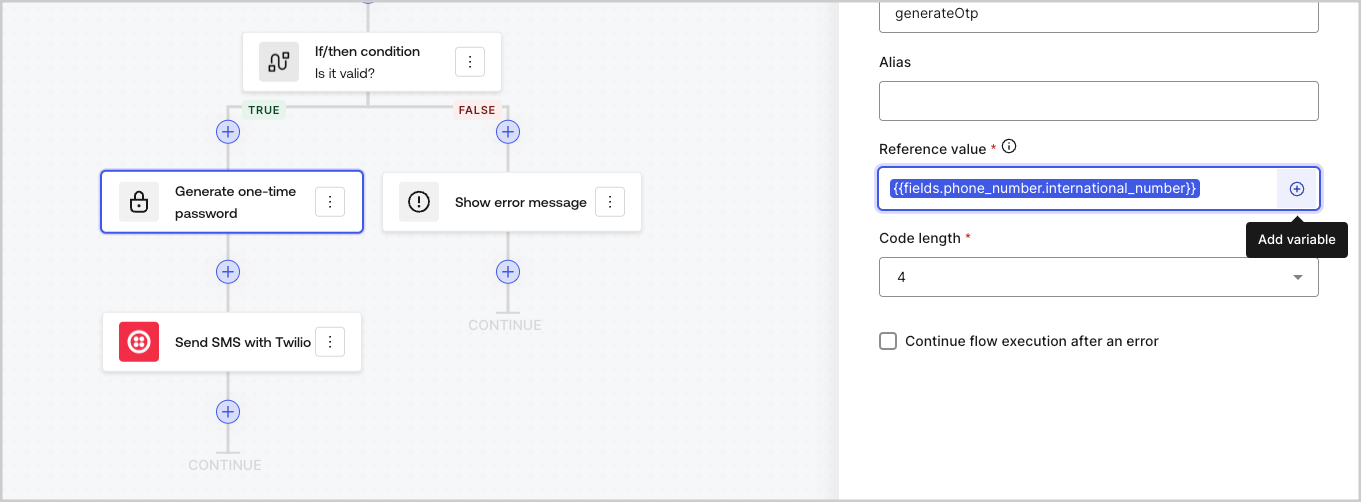
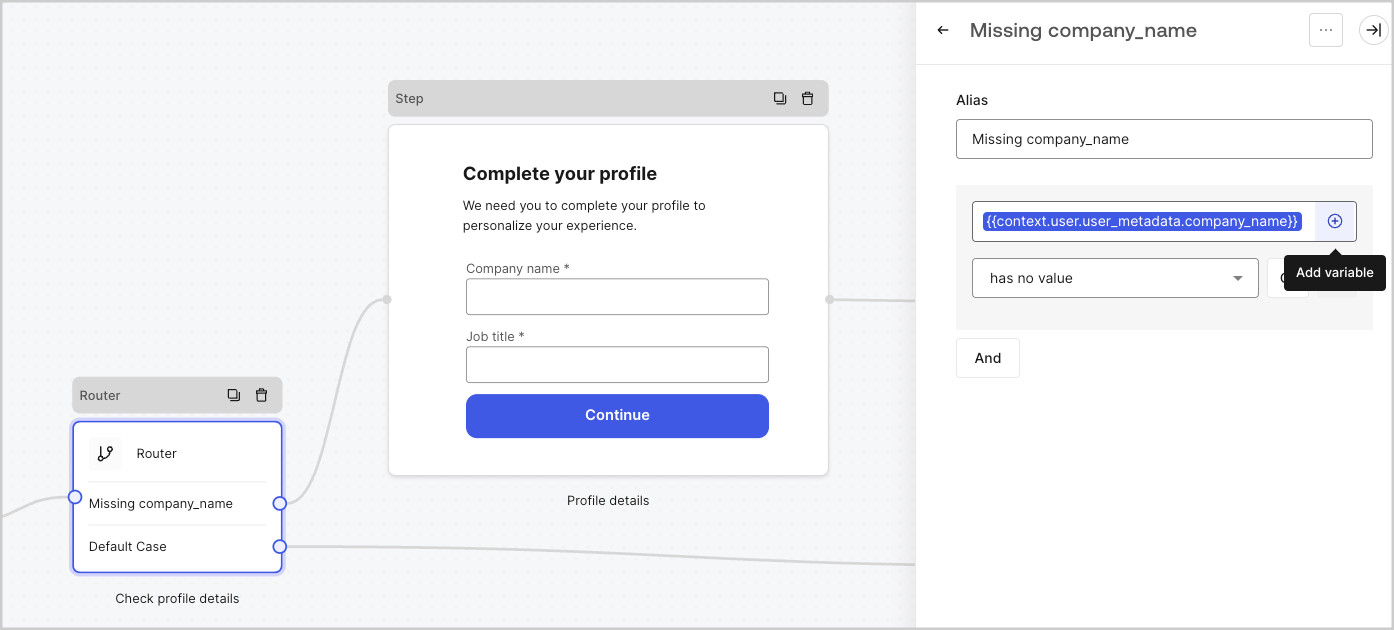
### Utiliser le menu de remplissage automatique

Le menu de remplissage automatique vous aide à localiser et à référencer correctement les variables existantes.
<Frame>
  <img src="https://mintcdn.com/docs-staging-docs-add-auth0-cli-management-api-examples/cQfrQxXNmJT2dZvx/docs/images/fr-ca/cdy7uua7fh8z/3SKnDuaMzSImxZtDDAoZaz/9ea800fad29ef71d1ded3c72b87660a4/Autocomplete-flows.png?fit=max&auto=format&n=cQfrQxXNmJT2dZvx&q=85&s=ba00103234f41a957c218a7b6a6fc757" alt="Dashboard > Actions > Forms > Flows" data-og-width="1361" width="1361" data-og-height="502" height="502" data-path="docs/images/fr-ca/cdy7uua7fh8z/3SKnDuaMzSImxZtDDAoZaz/9ea800fad29ef71d1ded3c72b87660a4/Autocomplete-flows.png" data-optimize="true" data-opv="3" srcset="https://mintcdn.com/docs-staging-docs-add-auth0-cli-management-api-examples/cQfrQxXNmJT2dZvx/docs/images/fr-ca/cdy7uua7fh8z/3SKnDuaMzSImxZtDDAoZaz/9ea800fad29ef71d1ded3c72b87660a4/Autocomplete-flows.png?w=280&fit=max&auto=format&n=cQfrQxXNmJT2dZvx&q=85&s=3bf9c757b84f6c866b374a253695ca5d 280w, https://mintcdn.com/docs-staging-docs-add-auth0-cli-management-api-examples/cQfrQxXNmJT2dZvx/docs/images/fr-ca/cdy7uua7fh8z/3SKnDuaMzSImxZtDDAoZaz/9ea800fad29ef71d1ded3c72b87660a4/Autocomplete-flows.png?w=560&fit=max&auto=format&n=cQfrQxXNmJT2dZvx&q=85&s=c128de11d7aff59de7cb67a9e2fcf6d5 560w, https://mintcdn.com/docs-staging-docs-add-auth0-cli-management-api-examples/cQfrQxXNmJT2dZvx/docs/images/fr-ca/cdy7uua7fh8z/3SKnDuaMzSImxZtDDAoZaz/9ea800fad29ef71d1ded3c72b87660a4/Autocomplete-flows.png?w=840&fit=max&auto=format&n=cQfrQxXNmJT2dZvx&q=85&s=7cec09452d070c2fdae125751f12c208 840w, https://mintcdn.com/docs-staging-docs-add-auth0-cli-management-api-examples/cQfrQxXNmJT2dZvx/docs/images/fr-ca/cdy7uua7fh8z/3SKnDuaMzSImxZtDDAoZaz/9ea800fad29ef71d1ded3c72b87660a4/Autocomplete-flows.png?w=1100&fit=max&auto=format&n=cQfrQxXNmJT2dZvx&q=85&s=22661c0a2f15a34b021f2598862b3252 1100w, https://mintcdn.com/docs-staging-docs-add-auth0-cli-management-api-examples/cQfrQxXNmJT2dZvx/docs/images/fr-ca/cdy7uua7fh8z/3SKnDuaMzSImxZtDDAoZaz/9ea800fad29ef71d1ded3c72b87660a4/Autocomplete-flows.png?w=1650&fit=max&auto=format&n=cQfrQxXNmJT2dZvx&q=85&s=2d1e3f616132e1da63ac6ac860e57a24 1650w, https://mintcdn.com/docs-staging-docs-add-auth0-cli-management-api-examples/cQfrQxXNmJT2dZvx/docs/images/fr-ca/cdy7uua7fh8z/3SKnDuaMzSImxZtDDAoZaz/9ea800fad29ef71d1ded3c72b87660a4/Autocomplete-flows.png?w=2500&fit=max&auto=format&n=cQfrQxXNmJT2dZvx&q=85&s=93c92191bbd2c42931c4f95f32bfa777 2500w" />
</Frame>

<Frame>
  <img src="https://mintcdn.com/docs-staging-docs-add-auth0-cli-management-api-examples/cQfrQxXNmJT2dZvx/docs/images/fr-ca/cdy7uua7fh8z/2kjRKozVgrd2a7UJXOANaN/ee5452d7210cd2f13b0e97763f11c82a/Autocomplete-forms.png?fit=max&auto=format&n=cQfrQxXNmJT2dZvx&q=85&s=ad407caf84df745a8fa8efd8d4d23fd6" alt="Dashboard > Actions > Forms > Form" data-og-width="1394" width="1394" data-og-height="630" height="630" data-path="docs/images/fr-ca/cdy7uua7fh8z/2kjRKozVgrd2a7UJXOANaN/ee5452d7210cd2f13b0e97763f11c82a/Autocomplete-forms.png" data-optimize="true" data-opv="3" srcset="https://mintcdn.com/docs-staging-docs-add-auth0-cli-management-api-examples/cQfrQxXNmJT2dZvx/docs/images/fr-ca/cdy7uua7fh8z/2kjRKozVgrd2a7UJXOANaN/ee5452d7210cd2f13b0e97763f11c82a/Autocomplete-forms.png?w=280&fit=max&auto=format&n=cQfrQxXNmJT2dZvx&q=85&s=0d241b3ccfcad5af62ab733d518634a1 280w, https://mintcdn.com/docs-staging-docs-add-auth0-cli-management-api-examples/cQfrQxXNmJT2dZvx/docs/images/fr-ca/cdy7uua7fh8z/2kjRKozVgrd2a7UJXOANaN/ee5452d7210cd2f13b0e97763f11c82a/Autocomplete-forms.png?w=560&fit=max&auto=format&n=cQfrQxXNmJT2dZvx&q=85&s=9011effc302c1efe29592acc827828c9 560w, https://mintcdn.com/docs-staging-docs-add-auth0-cli-management-api-examples/cQfrQxXNmJT2dZvx/docs/images/fr-ca/cdy7uua7fh8z/2kjRKozVgrd2a7UJXOANaN/ee5452d7210cd2f13b0e97763f11c82a/Autocomplete-forms.png?w=840&fit=max&auto=format&n=cQfrQxXNmJT2dZvx&q=85&s=455229247fc13b1469bdc607cf980d8b 840w, https://mintcdn.com/docs-staging-docs-add-auth0-cli-management-api-examples/cQfrQxXNmJT2dZvx/docs/images/fr-ca/cdy7uua7fh8z/2kjRKozVgrd2a7UJXOANaN/ee5452d7210cd2f13b0e97763f11c82a/Autocomplete-forms.png?w=1100&fit=max&auto=format&n=cQfrQxXNmJT2dZvx&q=85&s=1d45f70929edbaf0570f7554ce81fdfe 1100w, https://mintcdn.com/docs-staging-docs-add-auth0-cli-management-api-examples/cQfrQxXNmJT2dZvx/docs/images/fr-ca/cdy7uua7fh8z/2kjRKozVgrd2a7UJXOANaN/ee5452d7210cd2f13b0e97763f11c82a/Autocomplete-forms.png?w=1650&fit=max&auto=format&n=cQfrQxXNmJT2dZvx&q=85&s=bd1d4801833d7a96bca69b87ef498156 1650w, https://mintcdn.com/docs-staging-docs-add-auth0-cli-management-api-examples/cQfrQxXNmJT2dZvx/docs/images/fr-ca/cdy7uua7fh8z/2kjRKozVgrd2a7UJXOANaN/ee5452d7210cd2f13b0e97763f11c82a/Autocomplete-forms.png?w=2500&fit=max&auto=format&n=cQfrQxXNmJT2dZvx&q=85&s=06622487b78b519a215708f0f4ac0698 2500w" />
</Frame>
