> ## Documentation Index
> Fetch the complete documentation index at: https://docs-staging-docs-add-auth0-cli-management-api-examples.mintlify.site/llms.txt
> Use this file to discover all available pages before exploring further.

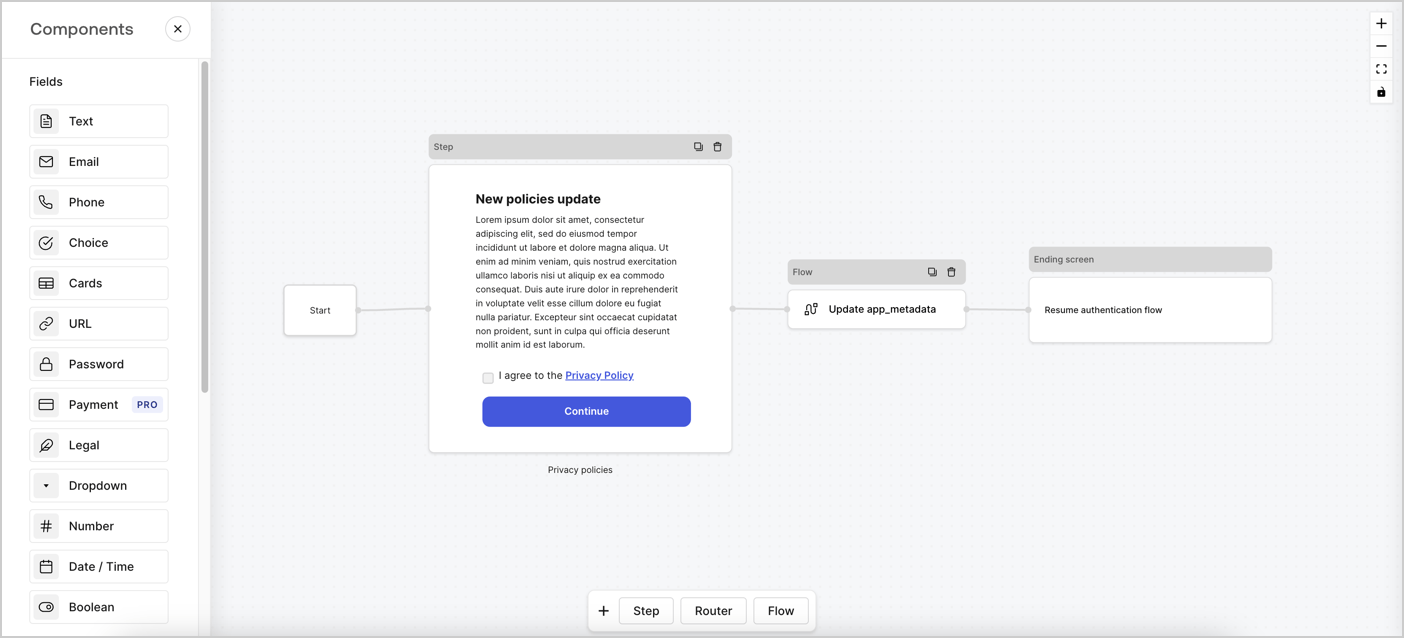
> Learn how to configure an update policy form using Forms for Actions for users to review and accept new terms of service or consent updates.

# Use Cases: Configure an update policy form using Forms

<Card title="Before you start">
  1. Create a [Machine-to-Machine Application](/docs/get-started/auth0-overview/create-applications/machine-to-machine-apps) with the following scopes enabled:

  * `read:users`
  * `update:users`
  * `create:users`
  * `read:users_app_metadata`
  * `update:users_app_metadata`
  * `create:users_app_metadata`

  2. Add a [Vault connection](/docs/customize/forms/vault) using the M2M application credentials.
</Card>

Forms for Actions allows you to create custom privacy policies flows and store the consent under the `app_metadata` object.
<Frame>
  <img src="https://mintcdn.com/docs-staging-docs-add-auth0-cli-management-api-examples/08rPOrmgU-lTUmEw/docs/images/cdy7uua7fh8z/6i68dMvHDTijfRmSgN1x8Q/ad900e7d4c0fb34645921435472b8684/privavy-policy-form.png?fit=max&auto=format&n=08rPOrmgU-lTUmEw&q=85&s=5c151603d90895e5c2e19a947d043bc4" alt="Dashboard > Actions > Forms > Privacy policy use case" data-og-width="1404" width="1404" data-og-height="638" height="638" data-path="docs/images/cdy7uua7fh8z/6i68dMvHDTijfRmSgN1x8Q/ad900e7d4c0fb34645921435472b8684/privavy-policy-form.png" data-optimize="true" data-opv="3" srcset="https://mintcdn.com/docs-staging-docs-add-auth0-cli-management-api-examples/08rPOrmgU-lTUmEw/docs/images/cdy7uua7fh8z/6i68dMvHDTijfRmSgN1x8Q/ad900e7d4c0fb34645921435472b8684/privavy-policy-form.png?w=280&fit=max&auto=format&n=08rPOrmgU-lTUmEw&q=85&s=d68b273183dab7e8f33118951989e667 280w, https://mintcdn.com/docs-staging-docs-add-auth0-cli-management-api-examples/08rPOrmgU-lTUmEw/docs/images/cdy7uua7fh8z/6i68dMvHDTijfRmSgN1x8Q/ad900e7d4c0fb34645921435472b8684/privavy-policy-form.png?w=560&fit=max&auto=format&n=08rPOrmgU-lTUmEw&q=85&s=bfcfd88ee407745b98151b65c7aece46 560w, https://mintcdn.com/docs-staging-docs-add-auth0-cli-management-api-examples/08rPOrmgU-lTUmEw/docs/images/cdy7uua7fh8z/6i68dMvHDTijfRmSgN1x8Q/ad900e7d4c0fb34645921435472b8684/privavy-policy-form.png?w=840&fit=max&auto=format&n=08rPOrmgU-lTUmEw&q=85&s=b42d1769c11a33215fc2ad869893c5a4 840w, https://mintcdn.com/docs-staging-docs-add-auth0-cli-management-api-examples/08rPOrmgU-lTUmEw/docs/images/cdy7uua7fh8z/6i68dMvHDTijfRmSgN1x8Q/ad900e7d4c0fb34645921435472b8684/privavy-policy-form.png?w=1100&fit=max&auto=format&n=08rPOrmgU-lTUmEw&q=85&s=bca65e3b7b66ff70b716e40b002033f6 1100w, https://mintcdn.com/docs-staging-docs-add-auth0-cli-management-api-examples/08rPOrmgU-lTUmEw/docs/images/cdy7uua7fh8z/6i68dMvHDTijfRmSgN1x8Q/ad900e7d4c0fb34645921435472b8684/privavy-policy-form.png?w=1650&fit=max&auto=format&n=08rPOrmgU-lTUmEw&q=85&s=312e66038515c0044b6c75117770c27a 1650w, https://mintcdn.com/docs-staging-docs-add-auth0-cli-management-api-examples/08rPOrmgU-lTUmEw/docs/images/cdy7uua7fh8z/6i68dMvHDTijfRmSgN1x8Q/ad900e7d4c0fb34645921435472b8684/privavy-policy-form.png?w=2500&fit=max&auto=format&n=08rPOrmgU-lTUmEw&q=85&s=6c0b806017943fd774f7f47756f3eab3 2500w" />
</Frame>

The sections below outline how you can create an Update Policy form using nodes and flows, along with steps for adding your form to a [Post Login](/docs/customize/actions/explore-triggers/signup-and-login-triggers/login-trigger) Action.

## Create a form from scratch

Follow these steps to create a form to gather information:

1. Open the Form editor by selecting **Auth0 Dashboard > Actions > Forms.**
2. Select **Create Form** > **Start from scratch**.

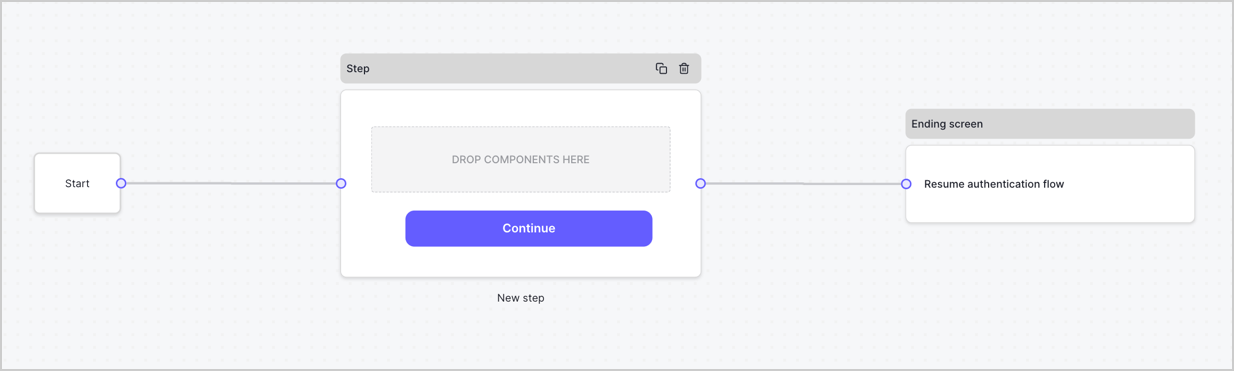
By default, a new form contains a Start node, a Step node, and an Ending screen node.
<Frame>
  <img src="https://mintcdn.com/docs-staging-docs-add-auth0-cli-management-api-examples/EAZzWoY3NNHfDjTC/docs/images/cdy7uua7fh8z/2TZ9jSjgEcARFpULI6hz4R/a4319a1bd482f2ee5cc23100fdb2f42c/New-form-Forms-for-action-use-case.png?fit=max&auto=format&n=EAZzWoY3NNHfDjTC&q=85&s=21344bf7068b22cba63c33c9ad7eaa74" alt="Dashboard > Forms > Use Cases > Form" data-og-width="1234" width="1234" data-og-height="371" height="371" data-path="docs/images/cdy7uua7fh8z/2TZ9jSjgEcARFpULI6hz4R/a4319a1bd482f2ee5cc23100fdb2f42c/New-form-Forms-for-action-use-case.png" data-optimize="true" data-opv="3" srcset="https://mintcdn.com/docs-staging-docs-add-auth0-cli-management-api-examples/EAZzWoY3NNHfDjTC/docs/images/cdy7uua7fh8z/2TZ9jSjgEcARFpULI6hz4R/a4319a1bd482f2ee5cc23100fdb2f42c/New-form-Forms-for-action-use-case.png?w=280&fit=max&auto=format&n=EAZzWoY3NNHfDjTC&q=85&s=6c4e438fb18c9df5f1a68c6ab2e04e36 280w, https://mintcdn.com/docs-staging-docs-add-auth0-cli-management-api-examples/EAZzWoY3NNHfDjTC/docs/images/cdy7uua7fh8z/2TZ9jSjgEcARFpULI6hz4R/a4319a1bd482f2ee5cc23100fdb2f42c/New-form-Forms-for-action-use-case.png?w=560&fit=max&auto=format&n=EAZzWoY3NNHfDjTC&q=85&s=38cc3d4af4b151fb26ebc61c74389aea 560w, https://mintcdn.com/docs-staging-docs-add-auth0-cli-management-api-examples/EAZzWoY3NNHfDjTC/docs/images/cdy7uua7fh8z/2TZ9jSjgEcARFpULI6hz4R/a4319a1bd482f2ee5cc23100fdb2f42c/New-form-Forms-for-action-use-case.png?w=840&fit=max&auto=format&n=EAZzWoY3NNHfDjTC&q=85&s=29b1bbff9d6a886352451f9d0d45bb93 840w, https://mintcdn.com/docs-staging-docs-add-auth0-cli-management-api-examples/EAZzWoY3NNHfDjTC/docs/images/cdy7uua7fh8z/2TZ9jSjgEcARFpULI6hz4R/a4319a1bd482f2ee5cc23100fdb2f42c/New-form-Forms-for-action-use-case.png?w=1100&fit=max&auto=format&n=EAZzWoY3NNHfDjTC&q=85&s=62fd1ac0ef8c3ac1e83d7e04028f5f06 1100w, https://mintcdn.com/docs-staging-docs-add-auth0-cli-management-api-examples/EAZzWoY3NNHfDjTC/docs/images/cdy7uua7fh8z/2TZ9jSjgEcARFpULI6hz4R/a4319a1bd482f2ee5cc23100fdb2f42c/New-form-Forms-for-action-use-case.png?w=1650&fit=max&auto=format&n=EAZzWoY3NNHfDjTC&q=85&s=9c2be13822b29909360bc0be365ae18a 1650w, https://mintcdn.com/docs-staging-docs-add-auth0-cli-management-api-examples/EAZzWoY3NNHfDjTC/docs/images/cdy7uua7fh8z/2TZ9jSjgEcARFpULI6hz4R/a4319a1bd482f2ee5cc23100fdb2f42c/New-form-Forms-for-action-use-case.png?w=2500&fit=max&auto=format&n=EAZzWoY3NNHfDjTC&q=85&s=54c55ab40588997fd2119b36a171040f 2500w" />
</Frame>

### Configure the Step node

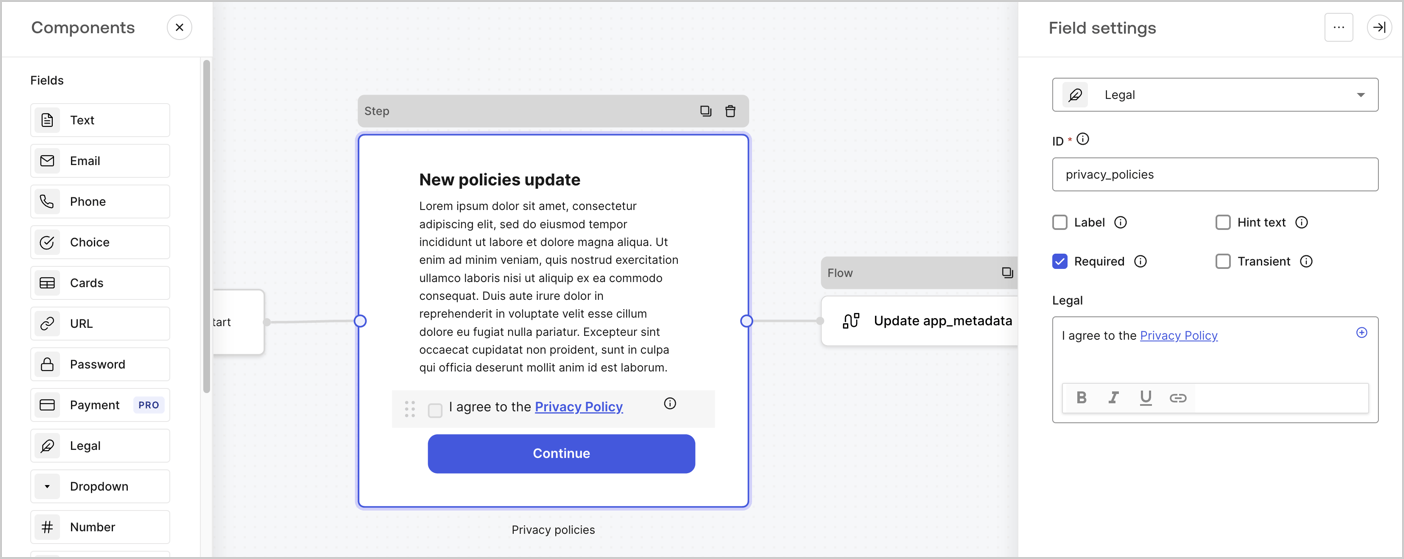
The Step node is the graphical interface visible to users. Add [Fields](/docs/customize/forms/nodes-and-components) to the Step node to collect the new agreement acceptance value by following these steps:

1. Drag a **Rich text** field from the **Components menu** into the **Step** node.

   * **Rich text**: Enter a description of your privacy policies updates.
   * Select **Save**.
2. Drag a **Legal** field into the **Step** node.

   * **ID**: Enter `privacy_policies`.
   * **Required**: Enable the checkbox.
   * **Legal**: Enter `I agree to the Privacy Policy`.
   * Select **Save**.
3. Select **Publish** to save.
<Frame>
  <img src="https://mintcdn.com/docs-staging-docs-add-auth0-cli-management-api-examples/LXfyzxpAmheuDMEk/docs/images/cdy7uua7fh8z/59zFFjQjAnjogkc2QGIqqJ/0ad66b1b636544122aa4e65968b76c2c/privacy-policy-step-node.png?fit=max&auto=format&n=LXfyzxpAmheuDMEk&q=85&s=f7fc3a09d23dcb6792af7e740b602930" alt="Dashboard > Actions > Forms > Use case privacy policy step node" data-og-width="1404" width="1404" data-og-height="559" height="559" data-path="docs/images/cdy7uua7fh8z/59zFFjQjAnjogkc2QGIqqJ/0ad66b1b636544122aa4e65968b76c2c/privacy-policy-step-node.png" data-optimize="true" data-opv="3" srcset="https://mintcdn.com/docs-staging-docs-add-auth0-cli-management-api-examples/LXfyzxpAmheuDMEk/docs/images/cdy7uua7fh8z/59zFFjQjAnjogkc2QGIqqJ/0ad66b1b636544122aa4e65968b76c2c/privacy-policy-step-node.png?w=280&fit=max&auto=format&n=LXfyzxpAmheuDMEk&q=85&s=3a854efe56ed1e127a8d19113ab313b8 280w, https://mintcdn.com/docs-staging-docs-add-auth0-cli-management-api-examples/LXfyzxpAmheuDMEk/docs/images/cdy7uua7fh8z/59zFFjQjAnjogkc2QGIqqJ/0ad66b1b636544122aa4e65968b76c2c/privacy-policy-step-node.png?w=560&fit=max&auto=format&n=LXfyzxpAmheuDMEk&q=85&s=77cd80325a19ee158d7ab9f6dc11e8d0 560w, https://mintcdn.com/docs-staging-docs-add-auth0-cli-management-api-examples/LXfyzxpAmheuDMEk/docs/images/cdy7uua7fh8z/59zFFjQjAnjogkc2QGIqqJ/0ad66b1b636544122aa4e65968b76c2c/privacy-policy-step-node.png?w=840&fit=max&auto=format&n=LXfyzxpAmheuDMEk&q=85&s=fd29f8406632fa01a8aa08d9285a570b 840w, https://mintcdn.com/docs-staging-docs-add-auth0-cli-management-api-examples/LXfyzxpAmheuDMEk/docs/images/cdy7uua7fh8z/59zFFjQjAnjogkc2QGIqqJ/0ad66b1b636544122aa4e65968b76c2c/privacy-policy-step-node.png?w=1100&fit=max&auto=format&n=LXfyzxpAmheuDMEk&q=85&s=fe25df7036932b87ca8f7d550f03c450 1100w, https://mintcdn.com/docs-staging-docs-add-auth0-cli-management-api-examples/LXfyzxpAmheuDMEk/docs/images/cdy7uua7fh8z/59zFFjQjAnjogkc2QGIqqJ/0ad66b1b636544122aa4e65968b76c2c/privacy-policy-step-node.png?w=1650&fit=max&auto=format&n=LXfyzxpAmheuDMEk&q=85&s=791bd070d7c395e5aa882415c226abbc 1650w, https://mintcdn.com/docs-staging-docs-add-auth0-cli-management-api-examples/LXfyzxpAmheuDMEk/docs/images/cdy7uua7fh8z/59zFFjQjAnjogkc2QGIqqJ/0ad66b1b636544122aa4e65968b76c2c/privacy-policy-step-node.png?w=2500&fit=max&auto=format&n=LXfyzxpAmheuDMEk&q=85&s=28ac5382944d4fb9d25f3b418b99a008 2500w" />
</Frame>

### Configure the Flow node

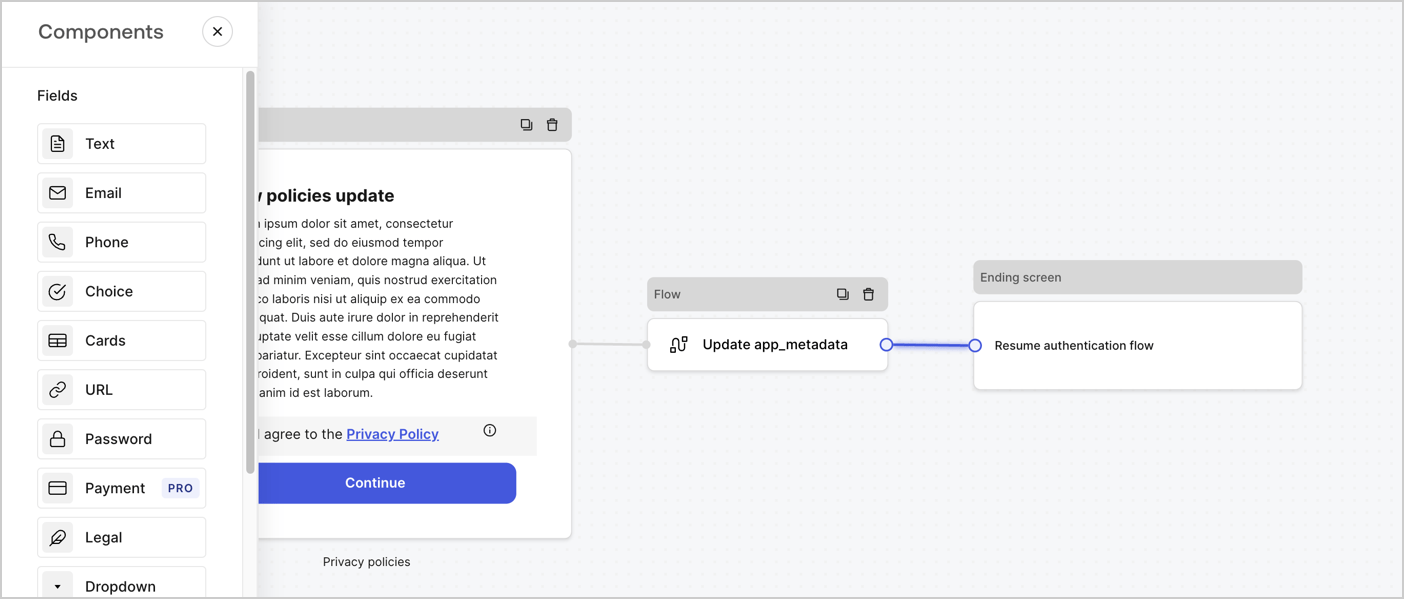
Add a **Flow** node after the **Step** node to update the `app_metadata` and resume the authentication flow by following these steps:

1. Select **Flow** from the bottom of the Form editor.
2. Remove the existing link between the **Step** and **Ending Screen** nodes.
3. Select the new **Flow** > **Click to add a flow** > **Create a new flow.**

   * Enter `Update app_metadata` in the **Name** field.
   * Select **Create**.
   * Select **Save**.
4. Link the **Flow** node to the **Step** and **Ending Screen** nodes as pictured below.
5. Select **Publish** to save.
<Frame>
  <img src="https://mintcdn.com/docs-staging-docs-add-auth0-cli-management-api-examples/08rPOrmgU-lTUmEw/docs/images/cdy7uua7fh8z/6YIkzm7SrpM9LW76AXuRzh/353c518fe82bbaa440836da1d83596d6/link-policies.png?fit=max&auto=format&n=08rPOrmgU-lTUmEw&q=85&s=a97019d4a532b9697fd5cdc5bb0dfb79" alt="Dashboard > Actions > Forms > Form" data-og-width="1404" width="1404" data-og-height="599" height="599" data-path="docs/images/cdy7uua7fh8z/6YIkzm7SrpM9LW76AXuRzh/353c518fe82bbaa440836da1d83596d6/link-policies.png" data-optimize="true" data-opv="3" srcset="https://mintcdn.com/docs-staging-docs-add-auth0-cli-management-api-examples/08rPOrmgU-lTUmEw/docs/images/cdy7uua7fh8z/6YIkzm7SrpM9LW76AXuRzh/353c518fe82bbaa440836da1d83596d6/link-policies.png?w=280&fit=max&auto=format&n=08rPOrmgU-lTUmEw&q=85&s=970f81f6979eedb4a5d4de11106abc71 280w, https://mintcdn.com/docs-staging-docs-add-auth0-cli-management-api-examples/08rPOrmgU-lTUmEw/docs/images/cdy7uua7fh8z/6YIkzm7SrpM9LW76AXuRzh/353c518fe82bbaa440836da1d83596d6/link-policies.png?w=560&fit=max&auto=format&n=08rPOrmgU-lTUmEw&q=85&s=00c25956f8ada2ae26a9228cba7d8ed0 560w, https://mintcdn.com/docs-staging-docs-add-auth0-cli-management-api-examples/08rPOrmgU-lTUmEw/docs/images/cdy7uua7fh8z/6YIkzm7SrpM9LW76AXuRzh/353c518fe82bbaa440836da1d83596d6/link-policies.png?w=840&fit=max&auto=format&n=08rPOrmgU-lTUmEw&q=85&s=0902aca81fcadb889f95244bca50effd 840w, https://mintcdn.com/docs-staging-docs-add-auth0-cli-management-api-examples/08rPOrmgU-lTUmEw/docs/images/cdy7uua7fh8z/6YIkzm7SrpM9LW76AXuRzh/353c518fe82bbaa440836da1d83596d6/link-policies.png?w=1100&fit=max&auto=format&n=08rPOrmgU-lTUmEw&q=85&s=404770ddf6500aeb64fbb9b8d54e7b3f 1100w, https://mintcdn.com/docs-staging-docs-add-auth0-cli-management-api-examples/08rPOrmgU-lTUmEw/docs/images/cdy7uua7fh8z/6YIkzm7SrpM9LW76AXuRzh/353c518fe82bbaa440836da1d83596d6/link-policies.png?w=1650&fit=max&auto=format&n=08rPOrmgU-lTUmEw&q=85&s=76c2197faa88e5af7ffd39f8e5141761 1650w, https://mintcdn.com/docs-staging-docs-add-auth0-cli-management-api-examples/08rPOrmgU-lTUmEw/docs/images/cdy7uua7fh8z/6YIkzm7SrpM9LW76AXuRzh/353c518fe82bbaa440836da1d83596d6/link-policies.png?w=2500&fit=max&auto=format&n=08rPOrmgU-lTUmEw&q=85&s=c388bd08906a67afe1fbeb93a8a18fbb 2500w" />
</Frame>

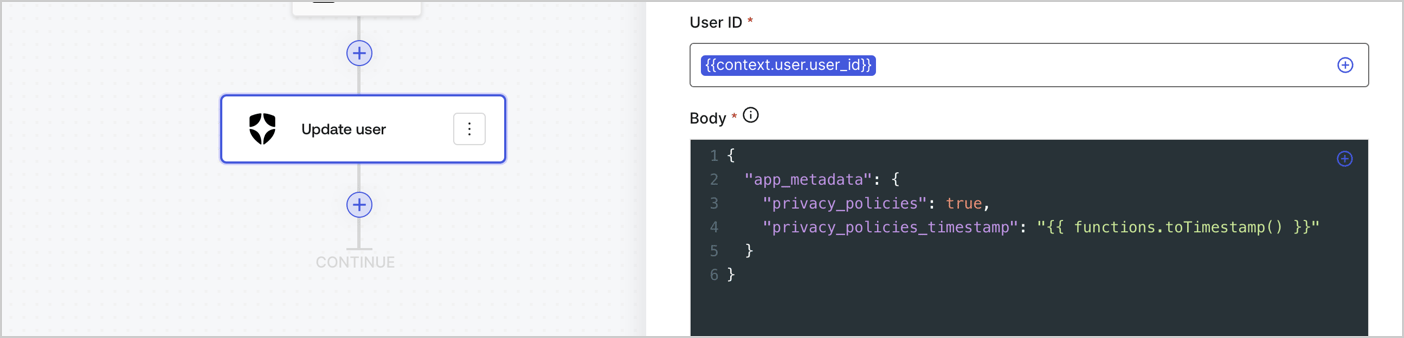
Add an Auth0 Update user action to the flow by following these steps:

1. Select the **Flow** **Update app\_metadata** > **Edit flow** to open the Flow editor in a new tab.
2. Below the StartAction, select the **+** icon to add an **Update user** action. Complete the fields below, then select **Save** to continue.

   * **Connection**: Select from the dropdown the Vault connection to your M2M application.

   * **User ID**: Enter `{{context.user.user_id}}`.

   * **Body**: Copy and paste the following code to update the app\_metadata with the privacy\_policies and privacy\_policies\_timestamp properties.

     ```text lines theme={null}
     {
       "app_metadata": {
         "privacy_policies": true,
         "privacy_policies_timestamp": "{{ functions.toTimestamp() }}"
       }
     }
     ```

   * Select **Save**.
3. Select **Publish** to save.
<Frame>
  <img src="https://mintcdn.com/docs-staging-docs-add-auth0-cli-management-api-examples/FmlAi_Smi9q-KzQL/docs/images/cdy7uua7fh8z/CvMNIwWrOUwaFW4X3G28p/1fb70ae57a20749d9ffaaba8dc0b7e26/update-user-privacy.png?fit=max&auto=format&n=FmlAi_Smi9q-KzQL&q=85&s=baa9e25588f054cd2eaf54d8ce93b80d" alt="Dashboard > Actions > Forms > User case privacy policy code" data-og-width="1404" width="1404" data-og-height="338" height="338" data-path="docs/images/cdy7uua7fh8z/CvMNIwWrOUwaFW4X3G28p/1fb70ae57a20749d9ffaaba8dc0b7e26/update-user-privacy.png" data-optimize="true" data-opv="3" srcset="https://mintcdn.com/docs-staging-docs-add-auth0-cli-management-api-examples/FmlAi_Smi9q-KzQL/docs/images/cdy7uua7fh8z/CvMNIwWrOUwaFW4X3G28p/1fb70ae57a20749d9ffaaba8dc0b7e26/update-user-privacy.png?w=280&fit=max&auto=format&n=FmlAi_Smi9q-KzQL&q=85&s=2e34108e2e3f8b87096ecd727cdfc140 280w, https://mintcdn.com/docs-staging-docs-add-auth0-cli-management-api-examples/FmlAi_Smi9q-KzQL/docs/images/cdy7uua7fh8z/CvMNIwWrOUwaFW4X3G28p/1fb70ae57a20749d9ffaaba8dc0b7e26/update-user-privacy.png?w=560&fit=max&auto=format&n=FmlAi_Smi9q-KzQL&q=85&s=64ee043f1250222713588702c9555d2b 560w, https://mintcdn.com/docs-staging-docs-add-auth0-cli-management-api-examples/FmlAi_Smi9q-KzQL/docs/images/cdy7uua7fh8z/CvMNIwWrOUwaFW4X3G28p/1fb70ae57a20749d9ffaaba8dc0b7e26/update-user-privacy.png?w=840&fit=max&auto=format&n=FmlAi_Smi9q-KzQL&q=85&s=122c7d01185af371779fdf85f2de5dcf 840w, https://mintcdn.com/docs-staging-docs-add-auth0-cli-management-api-examples/FmlAi_Smi9q-KzQL/docs/images/cdy7uua7fh8z/CvMNIwWrOUwaFW4X3G28p/1fb70ae57a20749d9ffaaba8dc0b7e26/update-user-privacy.png?w=1100&fit=max&auto=format&n=FmlAi_Smi9q-KzQL&q=85&s=e6dea714c71c9fd5f791c5888e6d3ef5 1100w, https://mintcdn.com/docs-staging-docs-add-auth0-cli-management-api-examples/FmlAi_Smi9q-KzQL/docs/images/cdy7uua7fh8z/CvMNIwWrOUwaFW4X3G28p/1fb70ae57a20749d9ffaaba8dc0b7e26/update-user-privacy.png?w=1650&fit=max&auto=format&n=FmlAi_Smi9q-KzQL&q=85&s=30176e802aecbd6c5baf4f7feb30f79b 1650w, https://mintcdn.com/docs-staging-docs-add-auth0-cli-management-api-examples/FmlAi_Smi9q-KzQL/docs/images/cdy7uua7fh8z/CvMNIwWrOUwaFW4X3G28p/1fb70ae57a20749d9ffaaba8dc0b7e26/update-user-privacy.png?w=2500&fit=max&auto=format&n=FmlAi_Smi9q-KzQL&q=85&s=94d56ccfac49a86aaeac131de1365e7a 2500w" />
</Frame>

<Callout icon="file-lines" color="#0EA5E9" iconType="regular">
  The flow **Update app\_metadata** adds a `privacy_policies true` value to the app`_metadata` object and also generates a timestamp with a [helper function.](/docs/customize/forms/variables)
</Callout>

## Retrieve the form render code

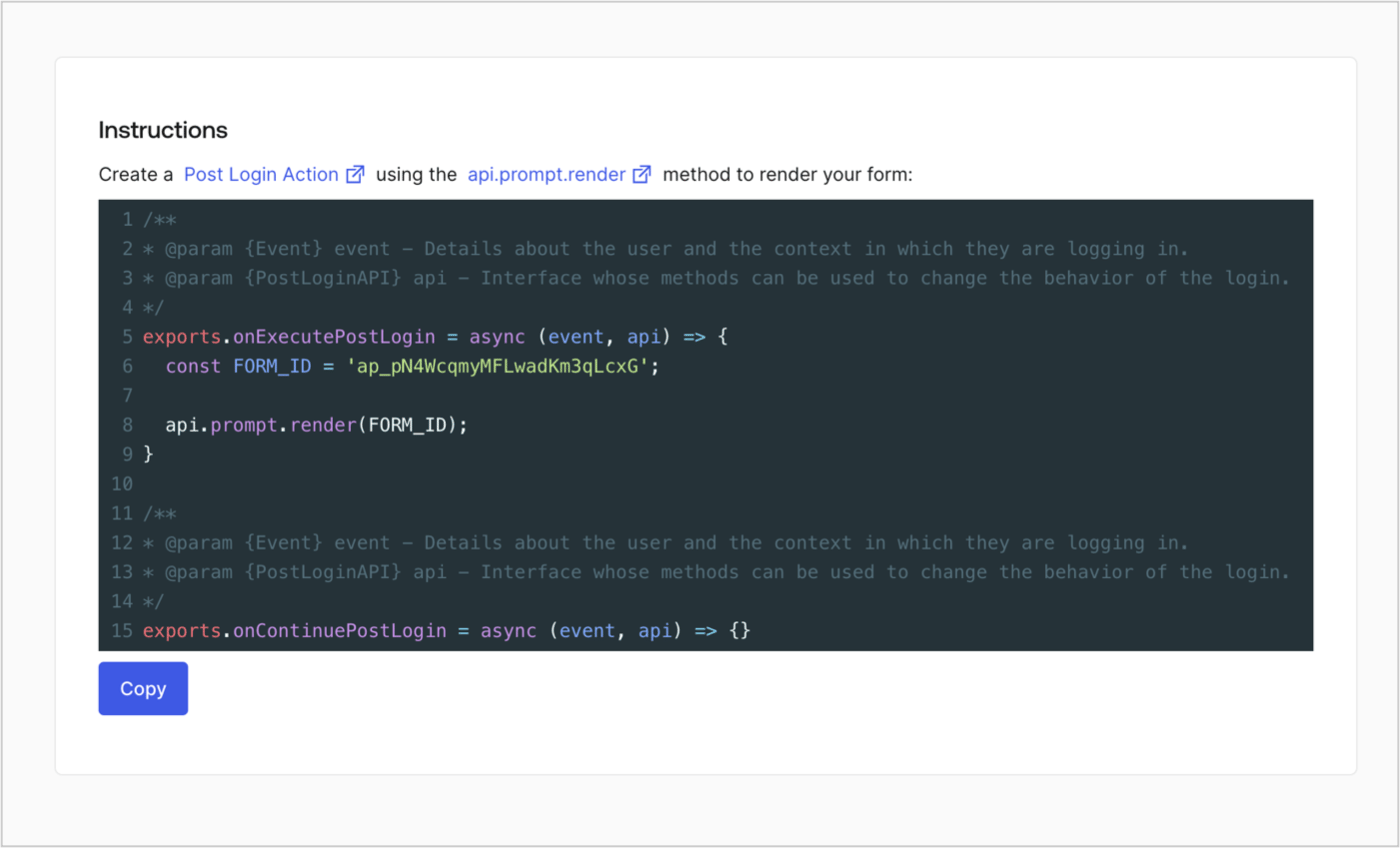
Retrieve your form render code to visually render the form with a custom Post Login Action by following these steps:

* From the Form editor, select **`<> Render`**.
* Select **Copy**.
<Frame>
  <img src="https://mintcdn.com/docs-staging-docs-add-auth0-cli-management-api-examples/IXSydCfMxe30z71m/docs/images/cdy7uua7fh8z/2EIUzc539sq9lwoTKbjoJv/496a864c0fc44a782c9cadca119dbfb0/embed.png?fit=max&auto=format&n=IXSydCfMxe30z71m&q=85&s=52cf918068244a43728e7f78c5b75460" alt="Dashboard > Actions > Forms > Form > Embed" data-og-width="1400" width="1400" data-og-height="848" height="848" data-path="docs/images/cdy7uua7fh8z/2EIUzc539sq9lwoTKbjoJv/496a864c0fc44a782c9cadca119dbfb0/embed.png" data-optimize="true" data-opv="3" srcset="https://mintcdn.com/docs-staging-docs-add-auth0-cli-management-api-examples/IXSydCfMxe30z71m/docs/images/cdy7uua7fh8z/2EIUzc539sq9lwoTKbjoJv/496a864c0fc44a782c9cadca119dbfb0/embed.png?w=280&fit=max&auto=format&n=IXSydCfMxe30z71m&q=85&s=cc961d992382f09e58fe4ca4d95e1d58 280w, https://mintcdn.com/docs-staging-docs-add-auth0-cli-management-api-examples/IXSydCfMxe30z71m/docs/images/cdy7uua7fh8z/2EIUzc539sq9lwoTKbjoJv/496a864c0fc44a782c9cadca119dbfb0/embed.png?w=560&fit=max&auto=format&n=IXSydCfMxe30z71m&q=85&s=04ea92ec56b504e379aaca56b5e83db2 560w, https://mintcdn.com/docs-staging-docs-add-auth0-cli-management-api-examples/IXSydCfMxe30z71m/docs/images/cdy7uua7fh8z/2EIUzc539sq9lwoTKbjoJv/496a864c0fc44a782c9cadca119dbfb0/embed.png?w=840&fit=max&auto=format&n=IXSydCfMxe30z71m&q=85&s=87fbea3f213941189744393a238688a5 840w, https://mintcdn.com/docs-staging-docs-add-auth0-cli-management-api-examples/IXSydCfMxe30z71m/docs/images/cdy7uua7fh8z/2EIUzc539sq9lwoTKbjoJv/496a864c0fc44a782c9cadca119dbfb0/embed.png?w=1100&fit=max&auto=format&n=IXSydCfMxe30z71m&q=85&s=7681dc1d4f4a56833d5c2a1edf053063 1100w, https://mintcdn.com/docs-staging-docs-add-auth0-cli-management-api-examples/IXSydCfMxe30z71m/docs/images/cdy7uua7fh8z/2EIUzc539sq9lwoTKbjoJv/496a864c0fc44a782c9cadca119dbfb0/embed.png?w=1650&fit=max&auto=format&n=IXSydCfMxe30z71m&q=85&s=fdbe50f57f545bd3792afdcfd80bbd4e 1650w, https://mintcdn.com/docs-staging-docs-add-auth0-cli-management-api-examples/IXSydCfMxe30z71m/docs/images/cdy7uua7fh8z/2EIUzc539sq9lwoTKbjoJv/496a864c0fc44a782c9cadca119dbfb0/embed.png?w=2500&fit=max&auto=format&n=IXSydCfMxe30z71m&q=85&s=e5e0fc912d52d432f38aebd9e7653bc8 2500w" />
</Frame>

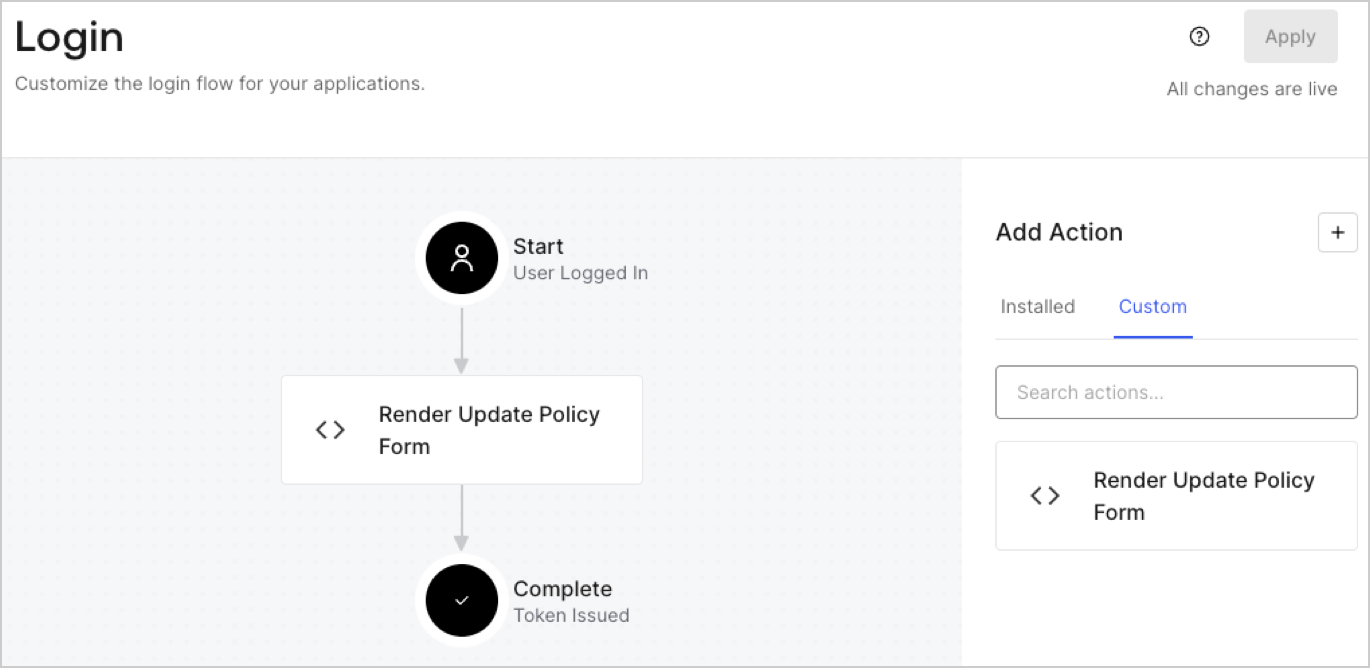
## Create a Post Login Action

Create a post-login Action to render your form by following these steps:

1. Navigate to **Auth0 Dashboard > Actions > Flows > Login.**
2. Select the **+** icon and Select **Build from scratch**:

   * **Name**: Enter `Render Update Policy Form`.
   * **Trigger**: Select `Login / Post Login`.
   * **Runtime**: Select the recommended version.
3. Select **Create**.

To configure the post-login Action:

1. Delete the existing code from the Code editor.
2. Paste the form render code into the Code editor.
3. Edit the code to define the conditional logic that will render the form.

   ```javascript lines theme={null}
   /**
   * @param {Event} event - Details about the user and the context in which they are logging in.
   * @param {PostLoginAPI} api - Interface whose methods can be used to change the behavior of the login.
   */
   exports.onExecutePostLogin = async (event, api) => {
     const FORM_ID = 'REPLACE_WITH_YOUR_FORM_ID';

     if (event.user.app_metadata.privacy_policies !== true) {
       api.prompt.render(FORM_ID);
     }
   }

   exports.onContinuePostLogin = async (event, api) => { }
   ```

   <Callout icon="file-lines" color="#0EA5E9" iconType="regular">
     The example code above will render the form when a user is missing the app metadata `privacy_policies` property.
   </Callout>
4. Select **Deploy.**
5. Drag and Drop the **Render Update Policy Form** Action to the **Login** flow.
   <Frame>
     <img src="https://mintcdn.com/docs-staging-docs-add-auth0-cli-management-api-examples/ywaoBgNKLkoXRhJz/docs/images/cdy7uua7fh8z/5TOwDgevZsBqd7yZynUYWU/41ca909dc3007aed4f40ff794a05efa5/postlogin.png?fit=max&auto=format&n=ywaoBgNKLkoXRhJz&q=85&s=a518f2e10a361f061f313b8c5f1fe70a" alt="Dashboard > Forms > Use Case > Render update policy form login action" data-og-width="1370" width="1370" data-og-height="668" height="668" data-path="docs/images/cdy7uua7fh8z/5TOwDgevZsBqd7yZynUYWU/41ca909dc3007aed4f40ff794a05efa5/postlogin.png" data-optimize="true" data-opv="3" srcset="https://mintcdn.com/docs-staging-docs-add-auth0-cli-management-api-examples/ywaoBgNKLkoXRhJz/docs/images/cdy7uua7fh8z/5TOwDgevZsBqd7yZynUYWU/41ca909dc3007aed4f40ff794a05efa5/postlogin.png?w=280&fit=max&auto=format&n=ywaoBgNKLkoXRhJz&q=85&s=233a86059b33a4fa4498bd20d8c53fd8 280w, https://mintcdn.com/docs-staging-docs-add-auth0-cli-management-api-examples/ywaoBgNKLkoXRhJz/docs/images/cdy7uua7fh8z/5TOwDgevZsBqd7yZynUYWU/41ca909dc3007aed4f40ff794a05efa5/postlogin.png?w=560&fit=max&auto=format&n=ywaoBgNKLkoXRhJz&q=85&s=f41a16b19317a242108d176118344ce4 560w, https://mintcdn.com/docs-staging-docs-add-auth0-cli-management-api-examples/ywaoBgNKLkoXRhJz/docs/images/cdy7uua7fh8z/5TOwDgevZsBqd7yZynUYWU/41ca909dc3007aed4f40ff794a05efa5/postlogin.png?w=840&fit=max&auto=format&n=ywaoBgNKLkoXRhJz&q=85&s=e455d74f89d1126d1089ea5d4bf4c8cd 840w, https://mintcdn.com/docs-staging-docs-add-auth0-cli-management-api-examples/ywaoBgNKLkoXRhJz/docs/images/cdy7uua7fh8z/5TOwDgevZsBqd7yZynUYWU/41ca909dc3007aed4f40ff794a05efa5/postlogin.png?w=1100&fit=max&auto=format&n=ywaoBgNKLkoXRhJz&q=85&s=937af5630f518f0dc8b6a15085ff6d51 1100w, https://mintcdn.com/docs-staging-docs-add-auth0-cli-management-api-examples/ywaoBgNKLkoXRhJz/docs/images/cdy7uua7fh8z/5TOwDgevZsBqd7yZynUYWU/41ca909dc3007aed4f40ff794a05efa5/postlogin.png?w=1650&fit=max&auto=format&n=ywaoBgNKLkoXRhJz&q=85&s=c03d5cc84047e06ad01da461716fb435 1650w, https://mintcdn.com/docs-staging-docs-add-auth0-cli-management-api-examples/ywaoBgNKLkoXRhJz/docs/images/cdy7uua7fh8z/5TOwDgevZsBqd7yZynUYWU/41ca909dc3007aed4f40ff794a05efa5/postlogin.png?w=2500&fit=max&auto=format&n=ywaoBgNKLkoXRhJz&q=85&s=c2ebc1e4938b3b3dd8d2016ed51d3216 2500w" />
   </Frame>
6. Select **Apply.**

### Test implementation

Test the implementation by following these steps:

1. Log in with an existing user whose app`_metadata` attribute `privacy_policies` does not have a value.
2. The post-login Action in the Login flow will render the form and prompt for acceptance.
3. Select **Auth0 Dashboard > User Management > Users,** locate the user and verify that the `app_metadata` attribute `privacy_policies` contains a `true` value and a timestamp.
